How to run LocationSim for multiple parameters of GCEH
In Plotting all parameters to GCE-H in BubbleH simulation I showed the results of plotting lots of parameters to GCEH, in one simulation run. Here are some more details:
The process worked as follows:
- Generate edge list file with weights for run period
- Run GCEH script with multiple parameter values, on the edge list
- Generate community list files, and hierarchy files from each output of GCE for use by LocationSim
- Prepare configuration files for community ranking and simulation
- Generate community rankings for each community
- Run simulation for each community set
- Visualise output
1) Edge List
java -jar dtnsim.jar xml/graphs/edgelist.xml 4 DATASET=mit-nov-cheat
2) Run GCEG Script
mattstabeler@erdos:~/GCE/master$ php -f ~/LocationSim/scripts/clustering/batchGCE.php ~/LocationSim/OUTPUT/edgelist-graphs/mit-nov-cheat/edge_list.dat
 ' . $outfile  . '.gce_output_K-${K}_ST-${ST}_MAP-${MAP}_E-${E}_Z-${Z}.dat';

  foreach($ks as $k){
   foreach($es as $e){
     foreach($sts as $st){
       foreach($maps as $map){
          foreach($zs as $z){
            $run = preg_replace('/${K}/', $k, $command);
            $run = preg_replace('/${E}/', $e, $run);
            $run = preg_replace('/${Z}/', $z, $run);
            $run = preg_replace('/${MAP}/', $map, $run);
            $run = preg_replace('/${ST}/', $st, $run);
            $data = passthru($run);
            //~ `$run`;
          }
        }
      }
    }
  }

}
?>
3) Generate files for LocationSim
mattstabeler@erdos:~/LocationSim/scripts/transform$ php -f ConvertGCEHOutput.php ~/LocationSim/OUTPUT/edgelist-graphs/mit-nov-cheat/edge_list.dat.gce_output*.dat
This generates: a re-written gce output file, which has consecutively numbered community ID’s from 0 to N (edge_list.dat.gce_output_K-3_ST-0.5_MAP-0.5_E-0.15_Z-0.2.dat.renumbered.dat), a LocationSim compatible list of communitites (edge_list.dat.gce_output_K-3_ST-0.5_MAP-0.5_E-0.15_Z-0.2.dat.communites.dat) and a JSON representation of the communities for use in LocationSim (edge_list.dat.gce_output_K-5_ST-0.9_MAP-0.9_E-0.25_Z-0.2.dat.json).
toJson());
  file_put_contents($out_file . '.communites.dat', $parser->toSimCommunityList());
  file_put_contents($out_file . '.renumbered.dat', $parser->toString());
}
?>
Move the output of all files to /datasets/communities/{dataset namet}/{community type}
e.g /home/mattstabeler/LocationSim/datasets/communities/mit-nov-cheat/GCEH/
4) Config files
Datasets config:
~/LocationSim/xml/datasets/gceh-communities.xml
Community Generation Config
~/LocationSim/xml/bubbleH/centrality-k.xml
Simulation Config
~/LocationSim/xml/bubbleH/bubbleH-k.xml
5) Generate community rankings
mattstabeler@erdos:~/LocationSim$ java -jar dtnsim.jar xml/bubbleH/centrality-k.xml 10
6) Run simulation
mattstabeler@erdos:~/LocationSim$ java -jar dtnsim.jar xml/bubbleH/bubbleH-k.xml 10
During the run, the system used only 4 cores (out of 24) and 6.1GB of memory (out of 124GB) – and should not have affected other users considerably (hopefully!).
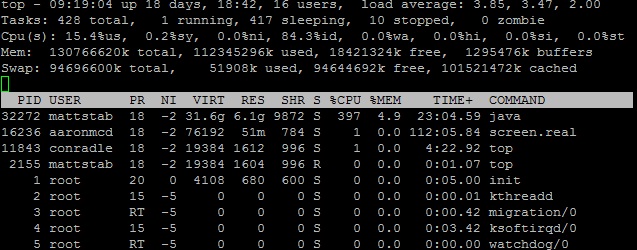
top command at runtime
7) Visualise output
mattstabeler@erdos:~/LocationSim$ python scripts/plot/plot-barchart-special.py 2 2 OUTPUT/bubbleH/mit-nov-cheat-k-test/GCEH-*/bubbleH/0.all-pairs.dat
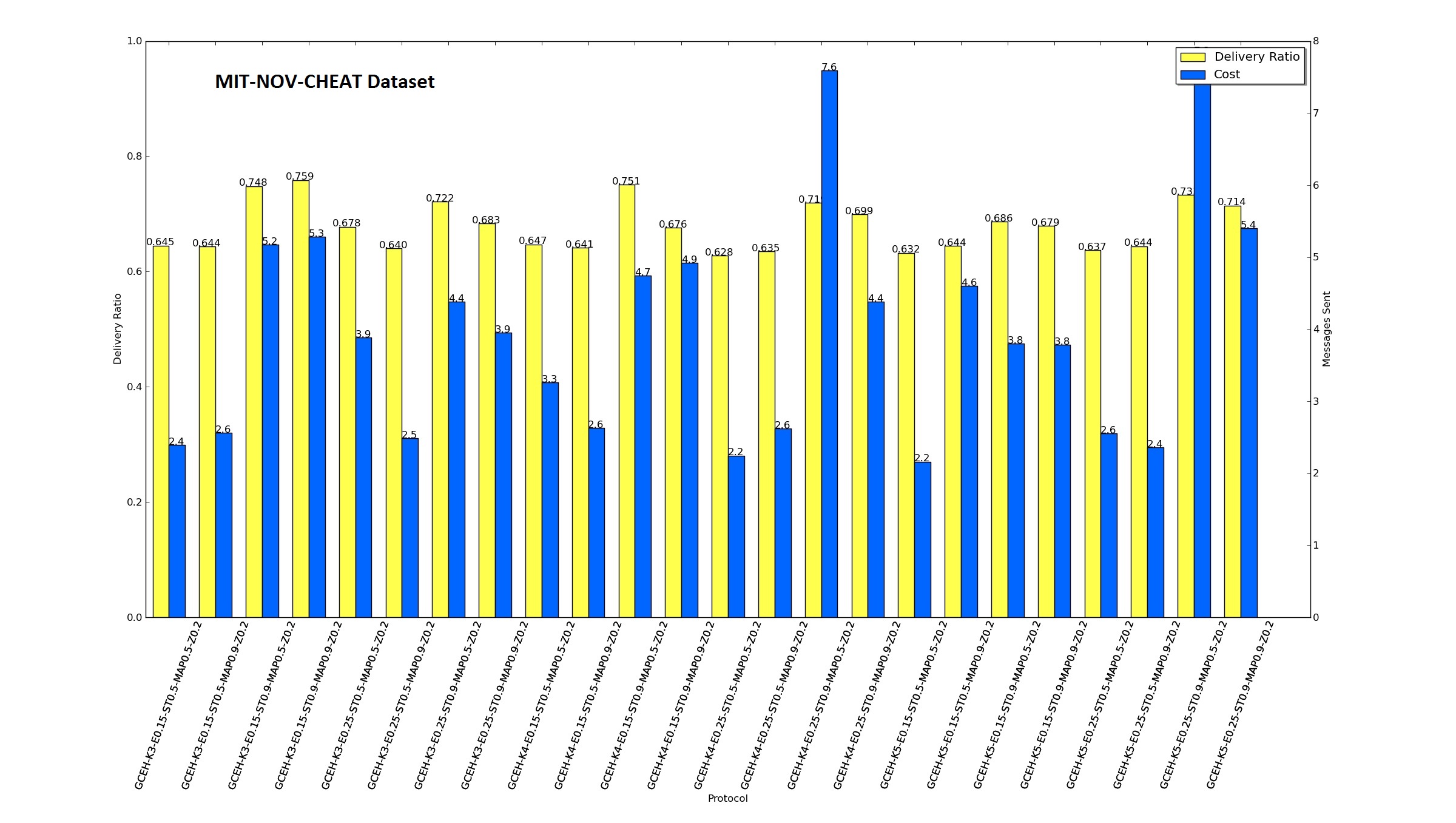
GCEH all parameters, simulated for BubbleH
Muchas gracias. ?Como puedo iniciar sesion?